Ability to Transfer Amount to Departed Groups
Stay is enhanced to allow users to transfer an amount from reservations, groups, A/R accounts, and house accounts to departed groups. Previously, users could not transfer an amount to departed groups. Through this enhancement, users are allowed to transfer charges to the following closed accounts based on the permissions assigned to them:
-
A/R accounts with Closed and Hold statuses
-
House accounts with Closed status
-
Reservations with Departed status
-
Groups with Departed status
Permission
The following new permission has been introduced to allow users to transfer charges or amount to departed groups:
-
WriteClosedGroup
This permission is assigned to the following roles by default:
-
System Administrator
-
Stay Hotel Manager
-
Stay Hotel Supervisor
-
Guest Service Agent Supervisor
-
Stay Accounting
-
Accounts Receivable Manager
Enhancements Made to Transferring Charges to Closed Accounts
Users can transfer charges from the Transfer Charges screen of the following accounts:
-
Reservation, group, or house account (Reservation/Group/House account ➜ Folio ➜ Transfer)
-
A/R account (A/R account ➜ Non-Invoiced Charges ➜ More ➜ Transfer Charges)
When transferring charges, if the logged-in user has any one of the following permissions, the option, Include Closed or Hold Accounts, in the filter icon will be displayed in the Transfer Charges pop-up screen:
-
WriteClosedAccountsReceivable
-
WriteClosedReservations
-
WriteClosedHouseAccounts
-
WriteClosedGroup
Previously, the option was displayed only when the logged-in user had the WriteClosedAccountsReceivable permission.
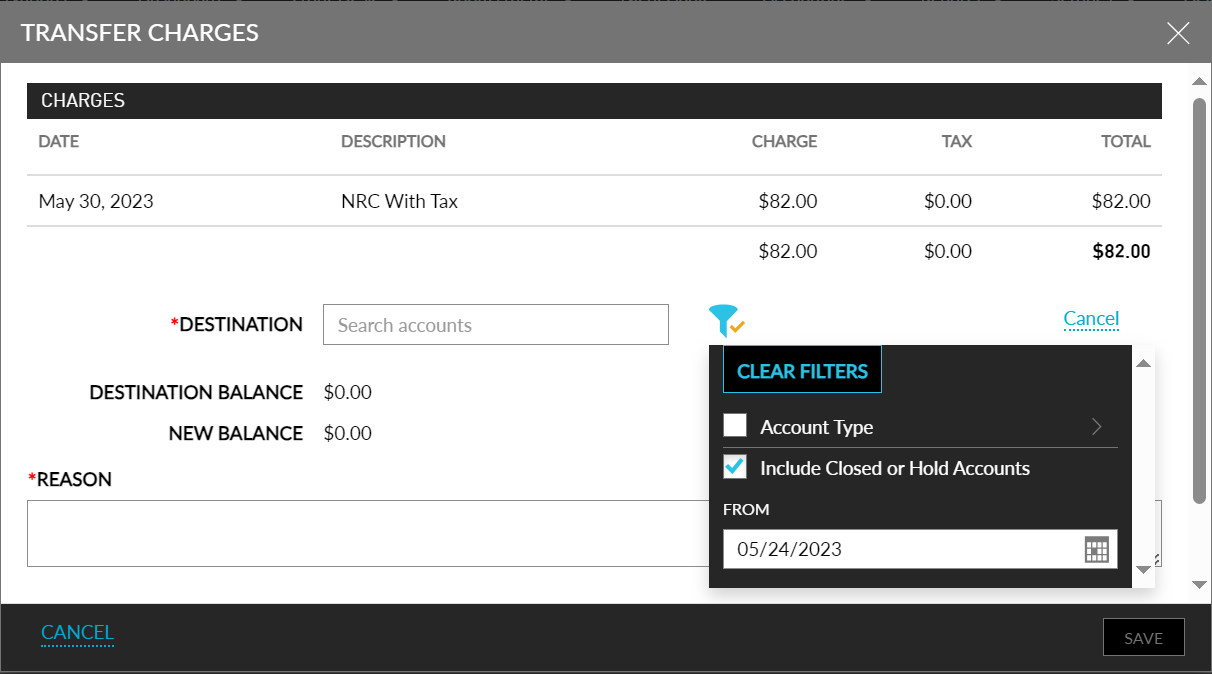
Users can select the Account Type of the account to which the charges must be transferred. To transfer charges to a closed account, the Include Closed or Hold Accounts filter option must be selected. When selected, users can select the date range from which the closed/hold accounts must be retrieved from the From date picker. By default, the date that is 7 days prior to the current property date is displayed. Users can select the preferred date.
The following table lists the various scenarios in which users are allowed to transfer charges to closed accounts:
|
Permissions |
Behaviour |
|---|---|
|
When a user does not have any of the following permissions:
|
The filter option, Include Closed or Hold Accounts, will not be displayed in the Transfer Charges pop-up screen and users cannot transfer charges to closed accounts. |
|
When a user has WriteClosedHouseAccounts permission. |
The filter option, Include Closed or Hold Accounts, will be displayed and the charges can be transferred to closed house accounts only. |
|
When a user has WriteClosedGroup permission |
The filter option, Include Closed or Hold Accounts, will be displayed, and the charges can be transferred to closed group accounts only. |
|
When a user has both WriteClosedHouseAccounts and WriteClosedGroup permissions. |
The filter option, Include Closed or Hold Accounts, will be displayed, and the charges can be transferred to closed house and group accounts. |
|
When a user has WriteClosedReservations permission. |
The filter option, Include Closed or Hold Accounts, will be displayed, and the charges can be transferred to closed reservations only. |
|
When a user has both WriteClosedReservations and WriteClosedHouseAccounts permissions. |
The filter option, Include Closed or Hold Accounts, will be displayed, and the charges can be transferred to closed reservations and house accounts. |
|
When a user has both WriteClosedReservations and WriteClosedGroup permissions. |
The filter option, Include Closed or Hold Accounts, will be displayed, and the charges can be transferred to closed reservations and group accounts. |
|
When a user has WriteClosedReservations, WriteClosedHouseAccounts, and WriteClosedGroup permissions. |
The filter option, Include Closed or Hold Accounts, will be displayed, and the charges can be transferred to closed reservations, house, and group accounts. |
|
When a user has WriteClosedAccountsReceivable permission. |
The filter option, Include Closed or Hold Accounts, will be displayed, and the charges can be transferred to closed A/R accounts only. |
|
When a user has both WriteClosedAccountsReceivable and WriteClosedHouseAccounts permissions. |
The filter option, Include Closed or Hold Accounts, will be displayed, and the charges can be transferred to closed A/R and house accounts. |
|
When a user has both WriteClosedAccountsReceivable and WriteClosedGroup permissions. |
The filter option, Include Closed or Hold Accounts, will be displayed, and the charges can be transferred to closed A/R and group accounts. |
|
When a user has WriteClosedAccountsReceivable, WriteClosedHouseAccounts, and WriteClosedGroup permissions. |
The filter option, Include Closed or Hold Accounts, will be displayed, and the charges can be transferred to closed A/R, house, and group accounts. |
|
When a user has all the following permissions:
|
The filter option, Include Closed or Hold Accounts, will be displayed, and the charges can be transferred to all the closed accounts. |
When the folio of the destination account is closed, users must be assigned the Stay_OverrideClosedFolio permission in addition to the mentioned permissions to override and transfer charges to the closed folios.
Transfer an Amount to Closed Accounts
Users can transfer an amount from the Transfer Amount screen of the following accounts:
-
Reservation, group, or house account (Reservation/Group/House account ➜ Folio ➜ More ➜Transfer Amount)
The filter icon in the Transfer Amount pop-up screen allows users to filter accounts based on their Account Type and to retrieve closed/hold accounts. To transfer an amount to closed accounts, the Include Closed or Hold Accounts filter option must be selected. When selected, users can select the date range from which the closed/hold accounts must be retrieved from the From date picker. By default, the date that is 7 days prior to the current property date is displayed. Users can select the preferred date.
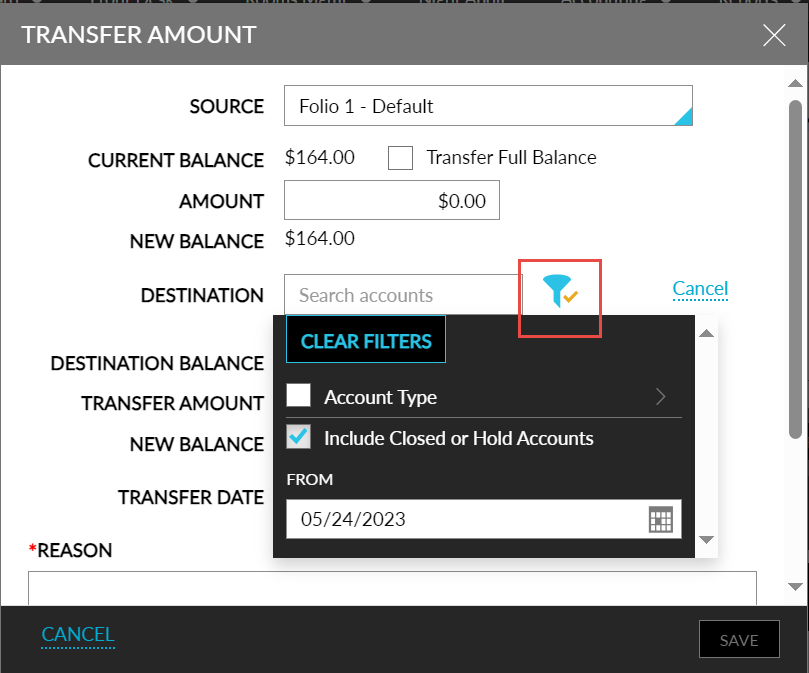
The following table lists the messages that are displayed when users without the necessary permissions transfer an amount to closed accounts:
|
Scenario |
Message Displayed |
|---|---|
|
When users without WriteClosedAccountsReservations permission transfer an amount to closed reservations. |
Not Authorized to Transfer Amount/Charges to Closed Reservation. |
|
When users without WriteClosedGroup permission transfer an amount to closed groups. |
Not Authorized to Transfer Amount/Charges to Closed Group. |
|
When users without WriteClosedAccountsReceivable permission transfer an amount to closed A/R accounts. |
Not Authorized to Transfer Amount/Charges to Closed or Hold A/R Account. |
|
When users without WriteClosedHouseAccounts permission transfer an amount to closed house accounts. |
Not Authorized to Transfer Amount/Charges to Closed House Account. |
To support this enhancement, the following changes have been made:
-
A new filter option, Account Type, has been added to the filter icon that is displayed in the Transfer Charges pop-up screen.
-
A new date picker, From, has been added to the filter icon that is displayed in the Transfer Charges pop-up screen.
-
A new filter icon has been added to the Transfer Amount pop-up screen that allows users to filter accounts based on their Account Type and to retrieve closed/hold accounts based on the selected date.